- 두 FortiGate를 Azure Virtual WAN vHub을 transit으로 연결해 BGP over Cloud 구현, 모든 단계의 CLI 설정 + Terraform 변환 포인트
- 적용 환경: FortiOS 7.x / Azure Virtual WAN vHub S2S VPN
- GitHub 저장소: https://github.com/20eung/fortigate-bgp-over-azure
1. BGP over Cloud가 필요한 상황
지점 두 곳을 FortiGate로 운영하면서 IPSec VPN으로 직접 연결하면, 회선 한 곳이 끊길 때 failover 경로가 없습니다. Azure Virtual WAN을 transit으로 끼우면 양쪽 FortiGate가 Azure vHub에 IPsec으로 붙고, Azure가 가운데에서 BGP 라우팅을 중계합니다. 회선 한 곳이 죽어도 Azure가 나머지 경로로 traffic을 우회시켜 줍니다.
이 구조의 핵심은 각 FortiGate가 Azure VPN과 BGP session 2개를 맺고, FortiGate끼리는 직접 BGP를 추가로 맺는 점입니다. Azure 쪽 BGP는 vHub routing table에 prefix를 광고하기 위함이고, FortiGate 간 BGP는 양쪽 내부 VLAN을 교환하기 위함입니다.
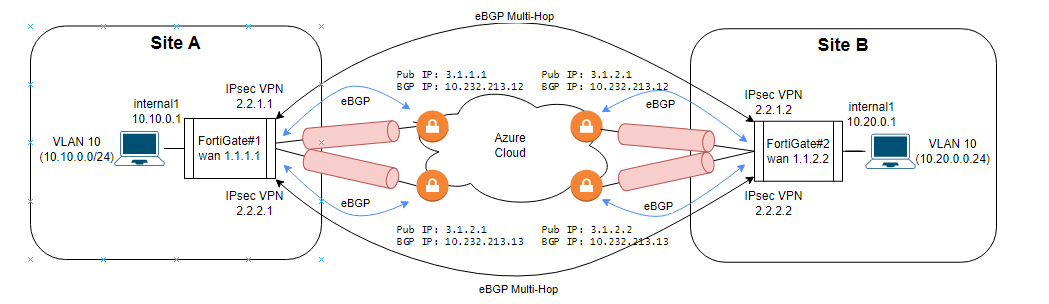
💼 Azure VPN Gateway가 active-active 인스턴스 2개를 자동으로 분리해 주는 동작 원리는 post-03(terraform-fortios-bgp-sdwan) 1섹션에서 다뤘습니다. 이 글은 두 FortiGate를 vHub로 연결하는 transit 절차에 집중합니다.
2. 모듈 구조: 두 FortiGate 설정을 한 Terraform 모듈로
레포의 CLI 절차는 FortiGate #1 / FortiGate #2가 각각 거의 동일한 설정을 가지므로, Terraform으로 변환하면 하나의 모듈을 for_each로 두 번 호출하는 패턴이 자연스럽습니다.
modules/
├── main.tf                  # 두 FortiGate 모듈 호출 (for_each)
├── variables.tf             # fg1_params, fg2_params
├── variables.auto.tfvars
├── provider.tf
└── fg/
    ├── wan.tf               # WAN 인터페이스 (WAN1/WAN2)
    ├── ipsec_phase1.tf      # azvpn1, azvpn2 phase1-interface
    ├── ipsec_phase2.tf      # azvpn1, azvpn2 phase2-interface
    ├── tunnel_interface.tf  # azvpn1, azvpn2 tunnel 인터페이스
    ├── vlan.tf              # internal1 + vlan10
    ├── firewall_policy.tf   # internal1 ↔ azvpn1/azvpn2
    ├── static_route.tf      # Azure BGP endpoint 정적 경로
    ├── bgp_acl.tf           # tunnel1/tunnel2/vlan10 access-list
    ├── bgp_azure.tf         # Azure VPN BGP neighbor + network
    └── bgp_remote_fg.tf     # Remote FortiGate BGP neighbor
루트의 main.tf:
locals {
    fgt_params = {
        fg1 = {
            as_number          = 65010
            router_id          = "10.10.0.1"
            wan_ip             = "1.1.1.1/24"
            internal_subnet    = "10.10.0.0/24"
            tunnel1_local_ip   = "2.2.1.1/32"
            tunnel1_remote_ip  = "2.2.1.3/29"
            tunnel2_local_ip   = "2.2.2.1/32"
            tunnel2_remote_ip  = "2.2.2.3/29"
            remote_fg_as       = 65020
            remote_fg_tunnel1  = "2.2.1.2"
            remote_fg_tunnel2  = "2.2.2.2"
        }
        fg2 = {
            as_number          = 65020
            router_id          = "10.20.0.1"
            wan_ip             = "1.1.2.2/24"
            internal_subnet    = "10.20.0.0/24"
            tunnel1_local_ip   = "2.2.1.2/32"
            tunnel1_remote_ip  = "2.2.1.4/29"
            tunnel2_local_ip   = "2.2.2.2/32"
            tunnel2_remote_ip  = "2.2.2.4/29"
            remote_fg_as       = 65010
            remote_fg_tunnel1  = "2.2.1.1"
            remote_fg_tunnel2  = "2.2.2.1"
        }
    }
}

module "fortigate" {
    source   = "./modules/fg"
    for_each = local.fgt_params

    name              = each.key
    as_number         = each.value.as_number
    router_id         = each.value.router_id
    # ... 나머지 변수 전달
}
💼 for_each로 모듈을 두 번 호출하면 CLI 절차의 FortiGate #1 / #2 2-column 표가 그대로 Terraform 모듈 호출 두 번으로 변환됩니다. 차이는 인자값뿐입니다.
3. WAN 인터페이스 + VLAN — 두 FortiGate가 다르게 가져야 하는 부분
WAN과 VLAN은 두 FortiGate가 다른 값을 가져야 하므로 for_each의 변수만 다르게 전달합니다.
| FortiGate | WAN 인터페이스 | IP | internal VLAN |
|---|---|---|---|
| #1 | wan2 | 1.1.1.1/24 | 10.10.0.0/24 |
| #2 | wan1 | 1.1.2.2/24 | 10.20.0.0/24 |
FortiGate #1 CLI:
config system interface
  edit "wan2"
    set vdom "root"
    set ip 1.1.1.1 255.255.255.0
    set allowaccess ping fgfm
    set type physical
    set role wan
  next
end
FortiGate #2 CLI:
config system interface
  edit "wan1"
    set vdom "root"
    set ip 1.1.2.2 255.255.255.0
    set allowaccess ping fgfm
    set type physical
    set role wan
  next
end
Terraform 변환 (FortiGate #1, #2 모두 fortios_system_interface 자원으로 표현):
resource "fortios_system_interface" "wan" {
    for_each = local.fgt_params

    name         = each.key == "fg1" ? "wan2" : "wan1"
    vdom         = "root"
    ip           = each.value.wan_ip
    allowaccess  = "ping fgfm"
    type         = "physical"
    role         = "wan"
}
💼 for_each 안에서 each.key로 분기하는 패턴은 자주 쓰이지만, 조건이 3개 이상으로 늘어나면 map으로 빼는 게 가독성에 좋습니다.
4. IPsec VPN 터널 — Azure와 호환되는 Phase 1/2 + tcp-mss 1350
Azure VPN Gateway는 두 FortiGate 모두 동일한 알고리즘 제안값을 요구합니다. 한쪽이 다른 값을 쓰면 tunnel이 established 되지 않습니다.
| Phase 1 설정 | 값 (양쪽 동일) |
|---|---|
| IKE Version | 2 |
| keylife | 28800 |
| proposal | aes256-sha1 |
| dpd | on-idle |
| dhgrp | 2 |
| dpd_retryinterval | 10 |
| net-device | disable |
| peertype | any |
| nattraversal | disable |
| Phase 2 설정 | 값 (양쪽 동일) |
|---|---|
| proposal | aes256-sha1 |
| dhgrp | 2 |
| auto-negotiate | enable |
| keylifeseconds | 27000 |
FortiGate #1, azvpn1:
config vpn ipsec phase1-interface
  edit "azvpn1"
    set interface "wan2"
    set ike-version 2
    set keylife 28800
    set peertype any
    set net-device disable
    set proposal aes256-sha1
    set dpd on-idle
    set dhgrp 2
    set remote-gw 3.1.1.1
    set psksecret PreSharedKey
    set dpd-retryinterval 10
  next
end

config vpn ipsec phase2-interface
  edit "azvpn1"
    set phase1name "azvpn1"
    set proposal aes256-sha1
    set dhgrp 2
    set auto-negotiate enable
    set keylifeseconds 27000
  next
end
FortiGate #2, azvpn1 (대칭 구조, remote-gw만 다름):
config vpn ipsec phase1-interface
  edit "azvpn1"
    set interface "wan1"
    set ike-version 2
    set keylife 28800
    set peertype any
    set net-device disable
    set proposal aes256-sha1
    set dpd on-idle
    set dhgrp 2
    set remote-gw 3.1.2.1
    set psksecret PreSharedKey
    set dpd-retryinterval 10
  next
end
💼 nattraversal=disable이 핵심입니다. Azure VPN Gateway는 NAT-traversal을 자동으로 처리하므로 FortiGate에서 enable로 두면 양쪽이 NAT 헤더를 추가해 tunnel은 up이지만 traffic이 안 흐릅니다. 이 부분은 post-03(terraform-fortios-bgp-sdwan) 3섹션에서 자세히 다뤘습니다.
5. Firewall Policy + Static Route — traffic이 흐를 통로 만들기
IPsec tunnel이 up 되어도 firewall policy가 없으면 양 방향 traffic이 차단됩니다. 그리고 tunnel interface에 IP가 있어도 Azure BGP endpoint로 가는 정적 경로가 없으면 BGP session이 established 되지 않습니다.
5.1 Firewall Policy (양쪽 동일)
config firewall policy
    edit 0
        set name "internal1-to-azvpn"
        set srcintf "internal1"
        set dstintf "azvpn1" "azvpn2"
        set srcaddr "all"
        set dstaddr "all"
        set action accept
        set schedule "always"
        set service "ALL"
        set logtraffic all
    next
    edit 0
        set name "azvpn-to-internal1"
        set srcintf "azvpn1" "azvpn2"
        set dstintf "internal1"
        set srcaddr "all"
        set dstaddr "all"
        set action accept
        set schedule "always"
        set service "ALL"
        set logtraffic all
    next
end
5.2 Static Route to Azure BGP Endpoint (양쪽 동일)
config router static
    edit 0
        set dst 10.232.213.12 255.255.255.255
        set device "azvpn1"
        set comment "AzVpnBgp1"
    next
    edit 0
        set dst 10.232.213.13 255.255.255.255
        set device "azvpn2"
        set comment "AzVpnBgp2"
    next
end
💼 10.232.213.12/13은 Azure VPN Gateway의 BGP endpoint IP입니다. Azure 측에서 확인 후 고정값으로 적어야 합니다. terraform 코드로 만들 때는 data "azurerm_virtual_hub" 또는 output으로 받은 값을 변수로 전달합니다.
6. BGP 설정 — 4개 neighbor로 양쪽을 모두 연결
이 구조에서 각 FortiGate는 BGP neighbor 4개를 가집니다.
| Neighbor | 용도 | AS | distribute-list-out |
|---|---|---|---|
| Azure 10.232.213.12 | Azure vHub BGP endpoint 1 | 65515 | tunnel1 |
| Azure 10.232.213.13 | Azure vHub BGP endpoint 2 | 65515 | tunnel2 |
| Remote FG tunnel1 IP | 반대편 FortiGate tunnel1 | 65010 or 65020 | vlan10 |
| Remote FG tunnel2 IP | 반대편 FortiGate tunnel2 | 65010 or 65020 | vlan10 |
6.1 Access-list로 prefix 분리
Azure vHub가 instance 0/1 양쪽에 다른 prefix를 받아야 하므로, distribute-list-out으로 tunnel1과 tunnel2에 광고할 prefix를 분리합니다.
config router access-list
    edit "tunnel1"
        config rule
            edit 1
                set prefix 2.2.1.1 255.255.255.255
            next
        end
    next
    edit "tunnel2"
        config rule
            edit 1
                set prefix 2.2.2.1 255.255.255.255
            next
        end
    next
    edit "vlan10"
        config rule
            edit 1
                set prefix 10.10.0.0 255.255.255.0
            next
        end
    next
end
6.2 Azure VPN BGP 설정
config router bgp
    set as 65010
    set router-id 10.10.0.1
    set ebgp-multipath enable
    set graceful-restart enable
    config neighbor
        edit "10.232.213.12"
            set ebgp-enforce-multihop enable
            set soft-reconfiguration enable
            set distribute-list-out "tunnel1"
            set remote-as 65515
        next
        edit "10.232.213.13"
            set ebgp-enforce-multihop enable
            set soft-reconfiguration enable
            set distribute-list-out "tunnel2"
            set remote-as 65515
        next
    end
    config network
        edit 1
            set prefix 2.2.1.1 255.255.255.255
        next
        edit 2
            set prefix 2.2.2.1 255.255.255.255
        next
    end
end
6.3 Remote FortiGate BGP 설정 (FortiGate #1 기준)
config router bgp
    set as 65010
    set router-id 10.10.0.1
    set ebgp-multipath enable
    set graceful-restart enable
    config neighbor
        edit "2.2.1.2"
            set ebgp-enforce-multihop enable
            set soft-reconfiguration enable
            set distribute-list-out "vlan10"
            set remote-as 65020
        next
        edit "2.2.2.2"
            set ebgp-enforce-multihop enable
            set soft-reconfiguration enable
            set distribute-list-out "vlan10"
            set remote-as 65020
        next
    end
    config network
        edit 3
            set prefix 10.10.0.0 255.255.255.0
        next
    end
end
ebgp-multipath enable + ebgp-enforce-multihop enable가 모두 필요한 이유:
– ebgp-multipath: BGP가 best path 한 개만 선택하지 않고 multipath 후보로 등록
– ebgp-enforce-multihop: eBGP 기본 TTL=1 제약을 풀어 tunnel IP를 source로 neighbor와 통신 가능
7. 검증 — Azure vHub Routing Table + FortiGate Routing Table + Ping
CLI 설정이 끝나면 3가지를 확인합니다.
7.1 Azure Virtual Hub Routing Table
vHub에서 양쪽 FortiGate의 prefix (10.10.0.0/24, 10.20.0.0/24) 가 각각 instance 0/1 양쪽 next-hop으로 보이는지 확인합니다.
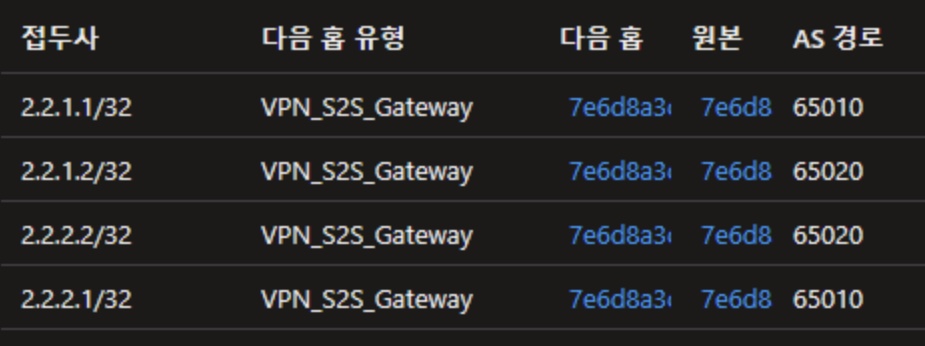
한쪽 instance에만 보이면 distribute-list-out이 잘못된 것이므로 access-list를 다시 확인합니다.
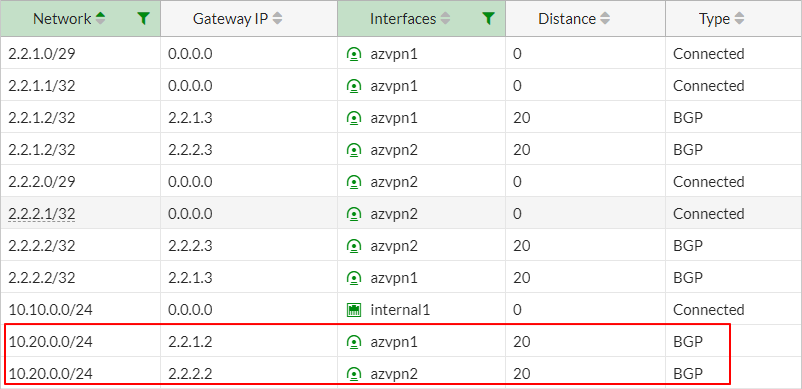
7.2 FortiGate Routing Table
각 FortiGate에서 BGP로 받은 prefix가 active 상태인지 확인합니다.
FortiGate #1:
FortiGate #2:
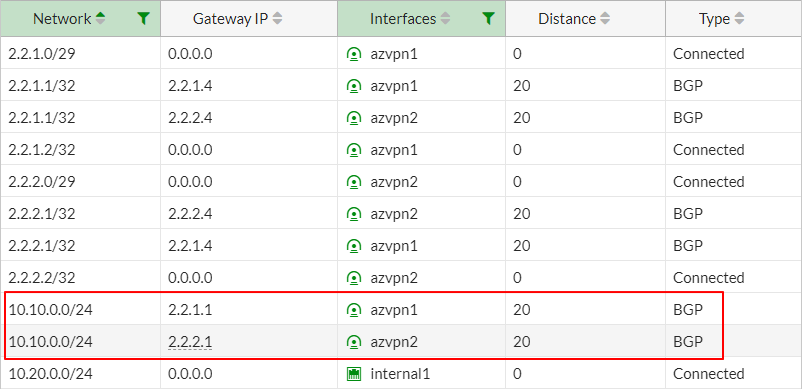
10.20.0.0/24 (반대편 VLAN) 가 multipath 양쪽으로 active면 양쪽 tunnel 모두 살아 있다는 뜻입니다. 한쪽만 보이면 tunnel 한 쪽이 down된 것이므로 IPsec session 상태부터 확인합니다.
7.3 양방향 Ping 테스트
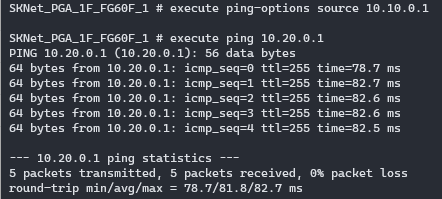
최종 확인은 양쪽 FortiGate의 VLAN IP끼리 ping입니다.
FortiGate #1 → #2:
FortiGate #2 → #1:
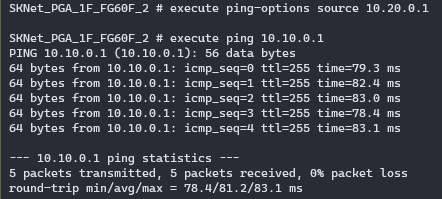
양쪽 ping이 모두 reply 오면 transit 구조가 완성된 것입니다. 한쪽만 실패하면 firewall policy, static route, BGP neighbor 중 어느 하나가 비대칭으로 설정된 상태입니다.
8. 자주 발생하는 오류와 해결법
| 증상/오류 메시지 | 원인 | 해결 방법 |
|---|---|---|
| tunnel은 up인데 traffic 안 흐름 | nattraversal=enable |
Phase 1 nattraversal=disable |
| tunnel은 up, Phase 2 proposal mismatch | 두 FortiGate 값 불일치 | Phase 1/2 모두 동일한 proposal + keylife 사용 |
| Azure vHub RT에 prefix 한쪽만 보임 | distribute-list-out 잘못 | tunnel1/2 access-list를 정확히 분리 |
| FortiGate RT에 multipath 안 보임 | ebgp-multipath 미설정 | fortios_router_bgp에 ebgp_multipath=enable |
| BGP neighbor Active | ebgp-enforce-multihop 미설정 | ebgp_enforce_multihop=enable |
| 큰 파일 전송 시 hang | tcp-mss 미설정 | tunnel interface에 tcp_mss=1350 또는 firewall policy에 tcp_mss_sender/receiver=1350 |
| FortiGate #2 ping 실패 | Static route 비대칭 | 양쪽 모두 Azure BGP endpoint 정적 경로 등록 |
9. 마치며
두 FortiGate를 Azure vHub transit으로 연결하는 BGP over Cloud 구조는, tunnel 2개를 양쪽 FortiGate에 동일하게 만들고 + BGP neighbor 4개(Azure 2개 + Remote FG 2개) + access-list 분리로만 구성됩니다. CLI 절차가 길어 보이지만, Terraform으로 변환하면 for_each로 두 FortiGate를 한 모듈에서 처리해 90% 코드가 중복 제거됩니다. 핵심은 Azure VPN active-active 응답 비대칭을 access-list로 분산시키는 것이고, 이 부분만 정확히 이해하면 CLI/Terraform 어느 쪽으로 진행해도 결과는 같습니다.
🎯 핵심 요약
- BGP over Cloud = 양쪽 FortiGate가 Azure vHub에 IPsec 2개 + BGP 2개를 각각 연결, Azure가 가운데 transit
- BGP neighbor 4개 = Azure endpoint 2개 + Remote FG tunnel 2개, 각 neighbor마다 distribute-list-out 지정
- access-list 분리 = tunnel1/2 별도 distribute-list-out이 Azure instance 0/1 응답 비대칭을 해결
ebgp-multipath+ebgp-enforce-multihop= 한쪽 tunnel down 시 자동 failover, 두 옵션 모두 필요- Terraform
for_each= FortiGate #1/#2 두 절차를 모듈 한 번 호출로 처리, 90% 코드 중복 제거 - 검증 3종 = Azure vHub Routing Table (양쪽 instance) + FortiGate Routing Table (multipath active) + 양방향 ping