- 두 FortiGate 사이 IPsec 단일 터널 위에 VxLAN으로 멀티 VLAN 확장, switch-interface로 vlan↔vxlan 묶기, LLCF(Link Loss Carry Forward)로 자동 failover
- 적용 환경: FortiOS 7.x / VxLAN software implementation
- GitHub 저장소: https://github.com/20eung/fortigate-vxlan-over-ipsec
1. VxLAN over IPsec이 필요한 상황
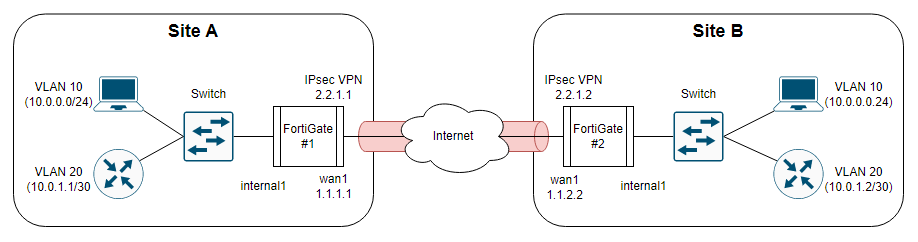
두 FortiGate를 IPsec으로 연결하면 기본적으로 single L3 tunnel 하나가 만들어집니다. 양쪽에 VLAN 10, VLAN 20이 있으면 두 VLAN을 모두 통과시키려면 IPsec phase2를 두 개 만들어야 하고, OSPF/BGP 같은 dynamic routing을 같이 올려야 트래픽이 양쪽에 모두 전달됩니다.
VxLAN over IPsec을 쓰면 IPsec phase2는 하나만 만들고, 그 위에 VxLAN 터널로 VLAN별로 별도 overlay를 생성합니다. 각 VxLAN은 VNI(VxLAN Network Identifier)로 구분되고, switch-interface로 VLAN과 묶이면 마치 같은 스위치에 VLAN 10/20이 둘 다 있는 것처럼 동작합니다. 라우팅 없이 L2 extension이 가능하므로, 양쪽에 같은 서브넷을 그대로 확장할 수 있습니다.
💼 FortiGate의 VxLAN은 software implementation입니다. ASIC 기반 hardware offload을 지원하는 모델과 그렇지 않은 모델이 섞여 있으면 한쪽만 offload가 동작해 성능 차이가 생길 수 있습니다. 양쪽 모델을 동일하게 맞추는 것을 권장합니다.
2. 모듈 구조: 7개 절을 6개 .tf 파일로 분리
레포의 CLI 절차는 WAN → IPsec → VLAN → VxLAN → Switch → LLCF(2개 절) 로 이어집니다. Terraform으로 변환하면 책임별로 6개 .tf 파일로 분리됩니다.
modules/fg/
├── wan.tf              # WAN 인터페이스
├── ipsec.tf            # phase1 + phase2 + tunnel interface
├── vlan.tf             # vlan10, vlan20
├── vxlan.tf            # vxlan.10, vxlan.20
├── switch_interface.tf # vxlan10, vxlan20 (member: vlan + vxlan)
├── llcf_interface.tf   # wan1 ↔ internal1 fail-detect
├── automation.tf       # action + trigger + stitch
└── variables.tf
루트의 main.tf에서 for_each로 두 FortiGate 모듈 호출:
module "fortigate" {
    source   = "./modules/fg"
    for_each = local.fgt_params

    name               = each.key
    wan_ip             = each.value.wan_ip
    wan_remote_ip      = each.value.wan_remote_ip
    tunnel_local_ip    = each.value.tunnel_local_ip
    tunnel_remote_ip   = each.value.tunnel_remote_ip
    vxlan_remote_ip    = each.value.vxlan_remote_ip
    psk                = var.psk
}
💼 post-04와 동일하게 for_each로 두 FortiGate 모듈을 호출합니다. 차이는 7개 절의 자원 종류뿐 (VxLAN, switch-interface, automation-stitch가 추가됨).
3. WAN + IPsec VPN 단일 터널 — VxLAN이 올라갈 기반
3.1 WAN 인터페이스
| FortiGate | WAN 인터페이스 | IP |
|---|---|---|
| FG#1 | wan1 | 1.1.1.1/24 |
| FG#2 | wan1 | 1.1.1.2/24 |
FortiGate #1:
config system interface
  edit "wan1"
    set vdom "root"
    set ip 1.1.1.1 255.255.255.0
    set allowaccess ping fgfm
    set type physical
    set role wan
  next
end
3.2 IPsec VPN 단일 터널
| Phase 1 설정 | 값 |
|---|---|
| interface | wan1 |
| peertype | any |
| net-device | disable |
| proposal | aes256-sha1 |
| remote-gw | 반대편 WAN IP |
| psksecret | PreSharedKey |
| Phase 2 설정 | 값 |
|---|---|
| phase1name | ipsecvpn |
| proposal | aes256-sha1 |
| auto-negotiate | enable |
FortiGate #1:
config vpn ipsec phase1-interface
  edit "ipsecvpn"
    set interface "wan1"
    set peertype any
    set net-device disable
    set proposal aes256-sha1
    set remote-gw 1.1.1.2
    set psksecret PreSharedKey
  next
end

config vpn ipsec phase2-interface
  edit "ipsecvpn"
    set phase1name "ipsecvpn"
    set proposal aes256-sha1
    set auto-negotiate enable
  next
end

config system interface
  edit "ipsecvpn"
    set vdom "root"
    set ip 2.2.1.1 255.255.255.255
    set allowaccess ping
    set type tunnel
    set remote-ip 2.2.1.2 255.255.255.252
    set interface "wan1"
  next
end
FortiGate #2 (대칭, remote-gw만 다름):
config vpn ipsec phase1-interface
  edit "ipsecvpn"
    set interface "wan1"
    set peertype any
    set net-device disable
    set proposal aes256-sha1
    set remote-gw 1.1.1.1
    set psksecret PreSharedKey
  next
end

config vpn ipsec phase2-interface
  edit "ipsecvpn"
    set phase1name "ipsecvpn"
    set proposal aes256-sha1
    set auto-negotiate enable
  next
end

config system interface
  edit "ipsecvpn"
    set vdom "root"
    set ip 2.2.1.2 255.255.255.255
    set allowaccess ping
    set type tunnel
    set remote-ip 2.2.1.1 255.255.255.252
    set interface "wan1"
  next
end
💼 IPsec이 단일 터널이라 phase2 proposal이 양쪽 다르면 tunnel up이 안 됩니다. proposal은 aes256-sha1로 통일하고, keylife는 생략(기본값)을 그대로 씁니다. Azure VPN과 달리 Fortinet ↔ Fortinet은 proposal 호환 범위가 넓습니다.
4. VLAN + VxLAN — 같은 IPsec 터널 위에 멀티 VLAN overlay
4.1 VLAN 인터페이스 (양쪽 동일)
config system interface
  edit "vlan10"
    set vdom "root"
    set device-identification enable
    set role lan
    set interface "internal1"
    set vlanid 10
  next
  edit "vlan20"
    set vdom "root"
    set device-identification enable
    set role lan
    set interface "internal1"
    set vlanid 20
  next
end
4.2 VxLAN 인터페이스 — VLAN별로 별도 overlay
| VxLAN 이름 | vni | remote-ip (FG#1) | remote-ip (FG#2) |
|---|---|---|---|
| vxlan.10 | 10 | 2.2.1.2 | 2.2.1.1 |
| vxlan.20 | 20 | 2.2.1.2 | 2.2.1.1 |
FortiGate #1:
config system vxlan
  edit "vxlan.10"
    set interface "ipsecvpn"
    set vni 10
    set remote-ip "2.2.1.2"
  next
  edit "vxlan.20"
    set interface "ipsecvpn"
    set vni 20
    set remote-ip "2.2.1.2"
  next
end
FortiGate #2:
config system vxlan
  edit "vxlan.10"
    set interface "ipsecvpn"
    set vni 10
    set remote-ip "2.2.1.1"
  next
  edit "vxlan.20"
    set interface "ipsecvpn"
    set vni 20
    set remote-ip "2.2.1.1"
  next
end
💼 remote-ip는 IPsec tunnel의 remote IP입니다. WAN 인터페이스 IP가 아닙니다. FG#1 입장에서 tunnel remote IP가 2.2.1.2 (FG#2의 tunnel local IP) 라는 점을 주의하세요.
5. Switch Interface — VLAN과 VxLAN을 묶는 핵심
system switch-interface 자원은 VLAN과 VxLAN을 같은 L2 도메인으로 묶습니다. 이렇게 묶이지 않으면 VxLAN이 올라가도 양쪽 VLAN이 같은 broadcast domain이 되지 못해 ARP/브로드캐스트가 흐르지 않습니다.
| Switch 이름 | member | type | intra-switch-policy | mac-ttl | span |
|---|---|---|---|---|---|
| vxlan10 | vlan10, vxlan.10 | switch | implicit | 300 | disable |
| vxlan20 | vlan20, vxlan.20 | switch | implicit | 300 | disable |
FortiGate #1 / #2 (양쪽 동일):
config system switch-interface
  edit "vxlan10"
    set vdom "root"
    set member "vlan10" "vxlan.10"
    set type switch
    set intra-switch-policy implicit
    set mac-ttl 300
    set span disable
  next
  edit "vxlan20"
    set vdom "root"
    set member "vlan20" "vxlan.20"
    set type switch
    set intra-switch-policy implicit
    set mac-ttl 300
    set span disable
  next
end
intra-switch-policy implicit이 핵심입니다. 이 값이 explicit이면 같은 switch-interface 안의 VLAN 간 통신이 막혀, 양쪽 VLAN이 같은 L2로 묶여도 inter-VLAN routing이 추가로 필요해집니다. implicit로 두면 동일 switch 안에서 VLAN 간 forwarding이 자동 처리됩니다.
6. LLCF (Link Loss Carry Forward) — 자동 failover의 시작
LLCF는 link 상태를 감지해 회선의 양 끝단 link를 함께 up/down 시키는 기능입니다. FortiGate의 경우 fail-detect/fail-alert를 통해 한 인터페이스 상태가 바뀌면 다른 인터페이스에 신호를 보내는 방식입니다.
6.1 LLCF (1) — 인터페이스 간 신호 전달
wan1 인터페이스 상태를 감지해 internal1을 up/down, 또는 internal1 상태를 감지해 wan1을 up/down 시킵니다.
config system interface
  edit "wan1"
    set fail-detect enable
    set fail-detect-option link-down
    set fail-alert-method link-down
    set fail-alert-interface internal1
  next
  edit "internal1"
    set fail-detect enable
    set fail-detect-option link-down
    set fail-alert-method link-down
    set fail-alert-interface wan1
  next
end
💼 이 단계까지만 설정하면 양쪽 FortiGate가 자기 자신의 인터페이스만 동기화합니다. 반대편 FortiGate에 신호를 보내려면 추가 설정이 필요합니다 — 이 부분은 LLCF (2) 의 automation-stitch가 담당합니다.
6.2 LLCF (2) — automation-stitch로 양쪽 장비 동기화
internal1 인터페이스가 down되면 이를 감지해 반대편 장비의 internal1도 down시킵니다. ipsecvpn 인터페이스가 down되면 양쪽 장비의 internal1을 down시킵니다.
FortiOS Event:
– Log ID 20099 = Interface status changed (internal1 up/down 감지)
– Log ID 37138 = IPsec connection status changed (ipsecvpn up/down, action 필드의 tunnel-down/tunnel-up만 필터링)
동작 알고리즘 (FG#1 / FG#2 양쪽 동일)
| 시점 | FG#1 internal1 | FG#1 ipsecvpn | FG#2 internal1 | FG#2 ipsecvpn |
|---|---|---|---|---|
| internal1 인터페이스 down trigger 발생 시 | ||||
| 1 | down trigger | |||
| 2 | down 설정 down trigger |
|||
| 3 | down 설정 | down trigger | ||
| 4 | down 설정 down trigger |
|||
| 5 | down 설정 | |||
| 6 | 60초 후 up 설정 | |||
| 7 | 60초 후 up 설정 | |||
| ipsecvpn 인터페이스 down trigger 발생 시 | ||||
| 1 | down trigger | down trigger | ||
| 2 | down 설정 down trigger |
down 설정 down trigger |
||
| 3 | down 설정 | down 설정 | ||
| 4 | 60초 후 up 설정 | 60초 후 up 설정 |
💼 인터페이스가 down에서 up으로 변경되는 trigger는 감지만 가능하고 자동화는 비활성화돼 있습니다. 60초 후 up 설정이 다시 살리는 동작이 핵심입니다.
Automation Action (FG#1, FG#2 양쪽 동일)
config system automation-action
   edit "internal1_down"
        set action-type cli-script
        set required enable
        set script "config system interface
edit internal1
set status down
end"
        set accprofile "api_super_admin"
    next
    edit "internal1_up"
        set action-type cli-script
        set required enable
        set script "config system interface
edit internal1
set status up
end"
        set accprofile "api_super_admin"
    next
   edit "ipsecvpn_down"
        set action-type cli-script
        set required enable
        set script "config system interface
edit ipsecvpn
set status down
end"
        set accprofile "api_super_admin"
    next
    edit "ipsecvpn_up"
        set action-type cli-script
        set required enable
        set script "config system interface
edit ipsecvpn
set status up
end"
        set accprofile "api_super_admin"
    next
end
Automation Trigger (FG#1, FG#2 양쪽 동일)
config system automation-trigger
    edit "internal1_down"
        set event-type event-log
        set logid 20099
        config fields
            edit 1
                set name "msg"
                set value "Link monitor: Interface internal1 was turned down"
            next
        end
    next
    edit "internal_up"
        set event-type event-log
        set logid 20099
        config fields
            edit 1
                set name "msg"
                set value "Link monitor: Interface internal1 was turned up"
            next
        end
    next
    edit "ipsecvpn_down"
        set event-type event-log
        set logid 37138
        config fields
            edit 1
                set name "action"
                set value "tunnel-down"
            next
        end
    next
    edit "ipsecvpn_up"
        set event-type event-log
        set logid 37138
        config fields
            edit 1
                set name "action"
                set value "tunnel-up"
            next
        end
    next
end
Automation Stitch (FG#1, FG#2 양쪽 동일)
config system automation-stitch
    edit "internal1_down"
        set trigger "internal1_down"
        set action "ipsecvpn_down"
    next
    edit "internal1_up"
        set trigger "internal1_up"
        set action "ipsecvpn_down"
    next
    edit "ipsecvpn_down"
        set trigger "ipsecvpn_down"
        set action "internal1_down"
    next
    edit "ipsecvpn_up"
        set trigger "ipsecvpn_up"
        set action "internal1_up"
    next
end
💼 internal1_up stitch의 action이 ipsecvpn_down인 점이 헷갈립니다. 원본 repo의 그대로이므로 그대로 보존했지만, 자동 동작 검증 후 환경에 따라 수정이 필요할 수 있습니다.
7. 자주 발생하는 오류와 해결법
| 증상/오류 메시지 | 원인 | 해결 방법 |
|---|---|---|
| IPsec tunnel은 up, VLAN 통신 안 됨 | switch-interface 누락 | system switch-interface에 vlan + vxlan 묶기 |
| VxLAN은 up, ARP 안 흐름 | remote-ip가 WAN IP로 설정됨 |
tunnel local/remote IP로 변경 |
| IPsec이 자주 down/up 반복 | proposal mismatch | phase1/phase2 모두 양쪽 동일하게 |
| LLCF 자동 failover가 안 됨 | automation-stitch 누락 | trigger + action + stitch 3종 모두 정의 |
| automation trigger 발동 안 됨 | logid/msg/action 필드 불일치 | FortiOS Event 로그에서 실제 값 확인 후 일치시키기 |
intra-switch-policy explicit |
VLAN 간 forwarding 막힘 | implicit으로 변경 |
| VxLAN 성능 차이 (한쪽만 빠름) | ASIC offload 비대칭 | 양쪽 FortiGate 모델 통일 또는 software-only 모드 명시 |
8. 마치며
VxLAN over IPsec은 IPsec phase2 한 줄을 늘리는 대신 멀티 VLAN overlay를 한 줄로 처리하는 패턴입니다. 라우팅 없이 양쪽 같은 VLAN을 그대로 확장할 수 있어 데이터센터 interconnect나 지점 간 동일 서브넷 확장에 잘 맞습니다. 다만 LLCF 자동 failover는 FortiOS Event 로그 + automation-stitch로 직접 짜야 하는데, logid/msg/action 값이 FortiOS 버전에 따라 미세하게 다를 수 있어 처음 적용 시 trigger 발동 여부를 반드시 확인해야 합니다.
🎯 핵심 요약
- IPsec phase2 한 줄 + VxLAN overlay = 멀티 VLAN을 라우팅 없이 확장, switch-interface로 vlan↔vxlan 묶기
system switch-interface가 핵심 = 묶지 않으면 같은 IPsec 위 overlay여도 broadcast domain이 안 됨intra-switch-policy implicit= 같은 switch 안 inter-VLAN forwarding 자동, explicit면 막힘- VxLAN
remote-ip= WAN IP가 아니라 tunnel local/remote IP - LLCF 자동 failover = LLCF (1) fail-detect + LLCF (2) automation-stitch, logid 20099/37138 + action 필드 필터링
- Terraform
for_each= 두 FortiGate를 모듈 한 번에 처리, 6개 .tf 파일로 책임 분리